Guide · 9 min read
Why does my 3D print keep failing? 12 fixes ranked by frequency
Updated April 2026 · Methodology and sources
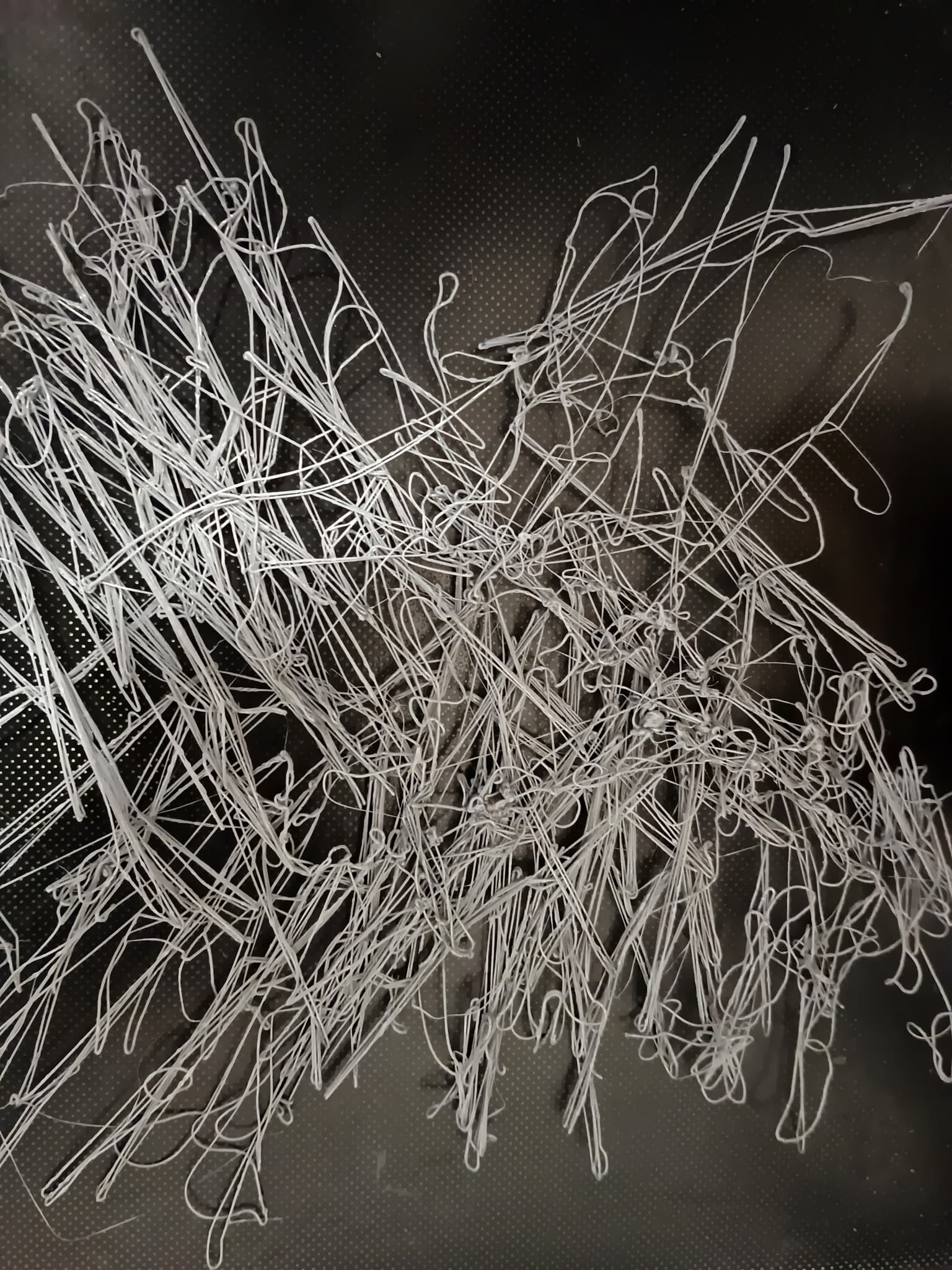
Print failures cluster around a dozen common causes. Most of what gets posted on Reddit as "why did this fail" is actually one of these twelve things, and each has a specific fix. Working through them in the order below (rough frequency, most common first) will resolve almost every hobbyist failure.
Before starting: track your failure rate. If you don't know whether you're at 5% or 25% failure, you don't know if you have a problem. The Failure Rate Calculator helps with this and compares you to hobbyist benchmarks.
1. Poor first layer adhesion
Most common failure by far. Print detaches partway or pulls up at a corner. Fixes, in order of likelihood to matter:
- Clean the bed with isopropyl alcohol (IPA 70% or higher) or soap and water. Skin oils from handling kill adhesion.
- Recalibrate z-offset. Nozzle should lay filament with a slight squish, not air-printing and not bulldozing.
- Check bed temperature is correct for the material (60°C PLA, 70 to 80°C PETG).
- Brim or raft for tall, small-footprint prints.
- Glue stick or hairspray as a bed prep if the surface is worn.
2. Wet filament
Symptoms: popping sounds during printing, stringy prints, brittle finished parts, inconsistent extrusion. PETG and TPU absorb moisture fastest. PLA tolerates more but isn't immune.
Fix: dry the filament in a filament dryer for 4 to 8 hours at the recommended temperature (40 to 50°C for PLA, 55 to 65°C for PETG, 45°C for TPU). Store dry filament in airtight containers with silica gel packs.
3. Clogged or partially clogged nozzle
Under-extrusion, thin layer lines, gaps in walls. Usually caused by burnt residue from older filament, dust, or carbon buildup.
Fix: cold pull. Heat to printing temp, manually feed filament, cool to 90°C, pull out cleanly. Repeat until clean. If that fails, replace the nozzle (they cost $2 to $10 and last 200 to 500 hours typically).
4. Warping (ABS especially)
Corners lift off the bed as the print cools. Common on ABS, occasional on PETG, rare on PLA.
Fix: enclosure (the real fix for ABS), heated bed at correct temp, reduce part cooling fan on first few layers, brim or mouse ears on corners, slower print speeds for first layers. If you can't enclose, switch to PETG or PLA.
5. Layer shift
Print suddenly skews mid-way. The printer lost steps on X or Y. Causes include: loose belts, something obstructing the head, too high speed and acceleration, or a mechanical collision.
Fix: check belt tension (should twang like a guitar string), reduce speed or acceleration in slicer, inspect for anything catching on the print.
6. Stringing and oozing
Thin hairs of filament between parts of the print. Common on PETG, occasional on PLA, common on TPU.
Fix: slower travel moves, higher retraction distance (0.8 to 2mm for direct drive, 4 to 6mm for Bowden), slightly lower nozzle temp, combing enabled in slicer, dry the filament.
7. Spaghetti (complete mid-print failure)
The print came off the bed, the nozzle kept extruding into air, you come back to a bird's nest. Usually the cascade failure of warping or poor bed adhesion.
Fix: fix the underlying adhesion issue (#1). A webcam plus print monitoring catches this early and pauses the printer before you waste 6 hours of filament.
8. Supports fail or fuse to the part
Overhangs sagging, supports that peel off and ruin the print, or supports that weld permanently to the part.
Fix: increase support Z distance in slicer (0.2mm is a good start), use tree supports for complex overhangs, orient the model to minimize overhang area. For critical parts, print with two materials and use a water-soluble support material.
9. Bridging failure
Long unsupported horizontal spans sagging. Usually means cooling is insufficient or bridging speed is too high.
Fix: increase part cooling fan to 100% during bridges, reduce bridging speed to 30 to 50% of normal, increase bridge flow slightly if droopy.
10. Elephant's foot
First layer bulges wider than the rest. Caused by nozzle too close to bed or bed too hot.
Fix: raise z-offset slightly (~0.02 to 0.04mm), reduce bed temp for first layer, or use a small chamfer on bottom edges of the model.
11. Filament run-out
Spool empties mid-print. Happens on prints over about 800g without filament run-out sensors.
Fix: enable filament run-out sensor (most modern printers have one), weigh the spool before long prints, or split large prints into multiple files you start manually.
12. Slicer setting mistakes
Wrong filament profile, wrong nozzle temp, wrong supports enabled, etc. The most embarrassing category because it's usually user error.
Fix: slow down when slicing. Double-check filament type matches what's loaded, check print summary for obvious issues (2 hour print suddenly showing 20 hours means something is off), print the first 10 layers and verify before committing to the full print.
Frequently asked
- What failure rate is normal?
- Under 5% is excellent, 5 to 10% is typical hobbyist range, 10 to 20% means something is off and worth investigating, and over 20% usually points at a specific mechanical or calibration problem. Print farms run at 2 to 4%. 0% is not realistic and chasing it will drive you crazy.
- Why do prints sometimes fail halfway through but start fine?
- Usually layer adhesion or thermal problems. Warping pulls a corner up, nozzle catches it on the next pass, print shifts or fails. Inadequate cooling on PLA causes overhangs to droop. Mid-print power fluctuations. Or filament run-out on long prints. Check what layer number or what feature it failed on for a clue.
- Is it worth using a webcam to monitor prints?
- Yes, especially for prints over 4 hours. Bambu's built-in cameras on P1S and X1C are good. For other printers, an Octoprint plus a cheap USB webcam works. Catching a failure 20 minutes in instead of 6 hours in saves a lot of wasted filament.
- Does bed leveling matter as much as people say?
- Yes. First layer calibration is the single biggest factor in print success. Auto-bed-leveling helps but doesn't replace a properly trammed frame or a clean bed. Print a first-layer calibration square before committing to a long print on a freshly wiped bed.
- I'm getting failures after replacing a nozzle, why?
- New nozzles need to be re-calibrated. The exact length from the nozzle tip to the bed changed, so your z-offset is off. Run bed leveling and z-offset calibration before printing. Also check that the nozzle is torqued to the right spec (about 1.5 Nm, or firm hand-tight with a wrench when the hotend is at 250°C).
Sources and references
- Bambu Lab, calibration and first-layer guides (bed leveling, flow calibration)
- Prusa Research, print troubleshooting in PrusaSlicer (warping, stringing, layer shift causes)
- Klipper, bed leveling documentation (mechanical fundamentals of first-layer adhesion)
- OrcaSlicer, calibration wiki (pressure advance, retraction, temperature towers)